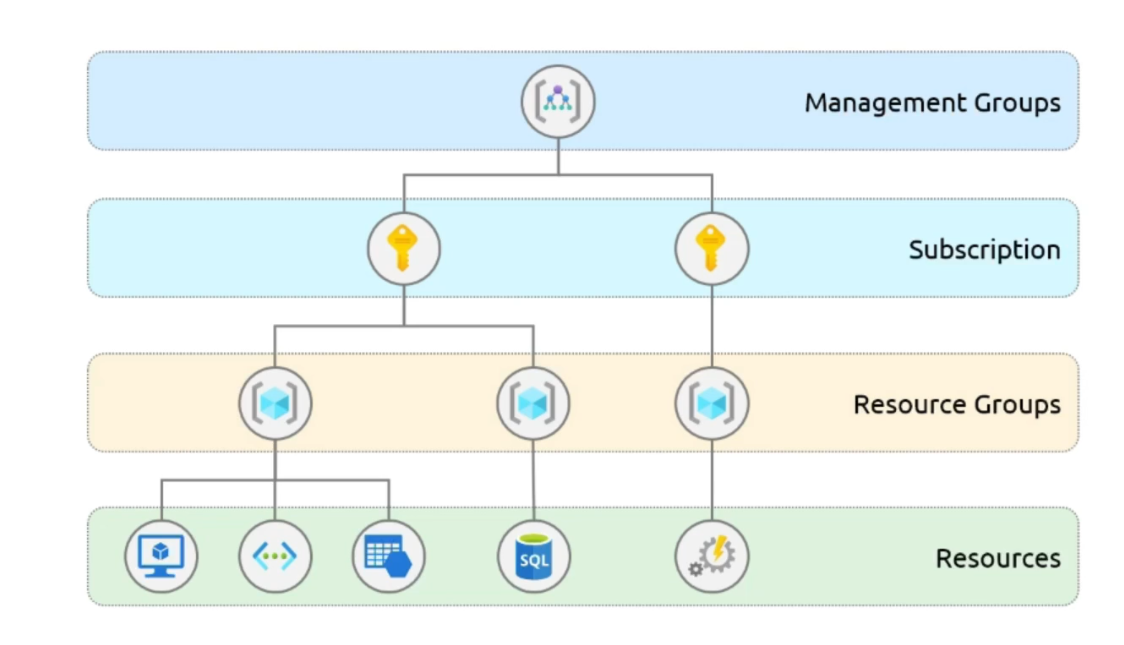
2.2 Subscriptions and Resource Groups
Azure Resources:
- It consists of elements as services such as storage, VMs, VNs, App services, SQL Databases, Functions.
Azure Resource Groups:
- Resource groups are containers that serve a pivotal role in Azure ecosystem, helps with managing and administering resources.
- In a nutshell, resource groups are a logical construct that allows us to group resources for easy management, provisioning and billing. They act as a single unit that holds all related resources.
- Key features:
- Placement - It’s like a box, where resources are placed inside, each resource can only reside in one resource group at a time. Simplifies management and access control.
- Region - Resource groups are placed in specific region, resources contained in that particular region can span across multiple regions. Helps with flexibility.
- Migration - Resources can be moved from one resource group to another, facilitating organizational changes and operational adjustments.
- Flexibility - By using multiple resource groups we can structure our services to align with different lifecycle phases.
To conclude, there are several resources offered by Azure, and we can group the resources with the help of resource groups. If we delete a resource group all the resources inside the resource group will be deleted. It collects the resources to use as a single unit.
Subscriptions:
This is the first part of setting up an azure service where we decide and manage the services, setup billing, define who gets to do what. Azure subscription is a boundary where the authenticated and authorized users can create and manage Azure resources.
It’s like having a secure ID card that grants you entry to the Azure Cloud services world. It’s basically an E-mail id with credit card details, which allows us to purchase multiple subscriptions.
Billing Boundary:
Each subscription we have is also a billing boundary, this keeps track of our usage and helps us keep an eye on the cost with distinct billing report and invoices. This helps us see exactly what we are spending and where helping you to manage your cloud budget transparency. Let’s say we have multiple subscriptions, and each one of them will have their billing consolidated in subscription level.
Access Control Boundary:
Subscriptions are also where we control the access. They allow us to specify who can do what by setting permissions for users, provisioning resources. There are dev subscriptions for developers who can develop and test, test subscription for QA, and Prod subscription for live customer facing services. Each subscription can have its own rules and permissions, ensuring people can only access the resources they need to do their job.
Management Groups:
Let’s say we have multiple subscriptions, we can group them by management groups. These groups are a level above the subscriptions and offer a way to efficiently manage access, policies and compliance across multiple Azure subscriptions.
- Aggregation of multiple subscriptions.
- More streamlined and collective management approach across entire organization’s resources.
- Inheritance of policies and conditions, setting these at management group level automatically inherits to the lower level, subscriptions, ensuring compliance and consistency.
- We can have up to 10,000 management groups inside an Azure active directory.